Video Wall Installation in Singapore: A Complete Guide
Published: October, 2026
By: Smart AV Solutions
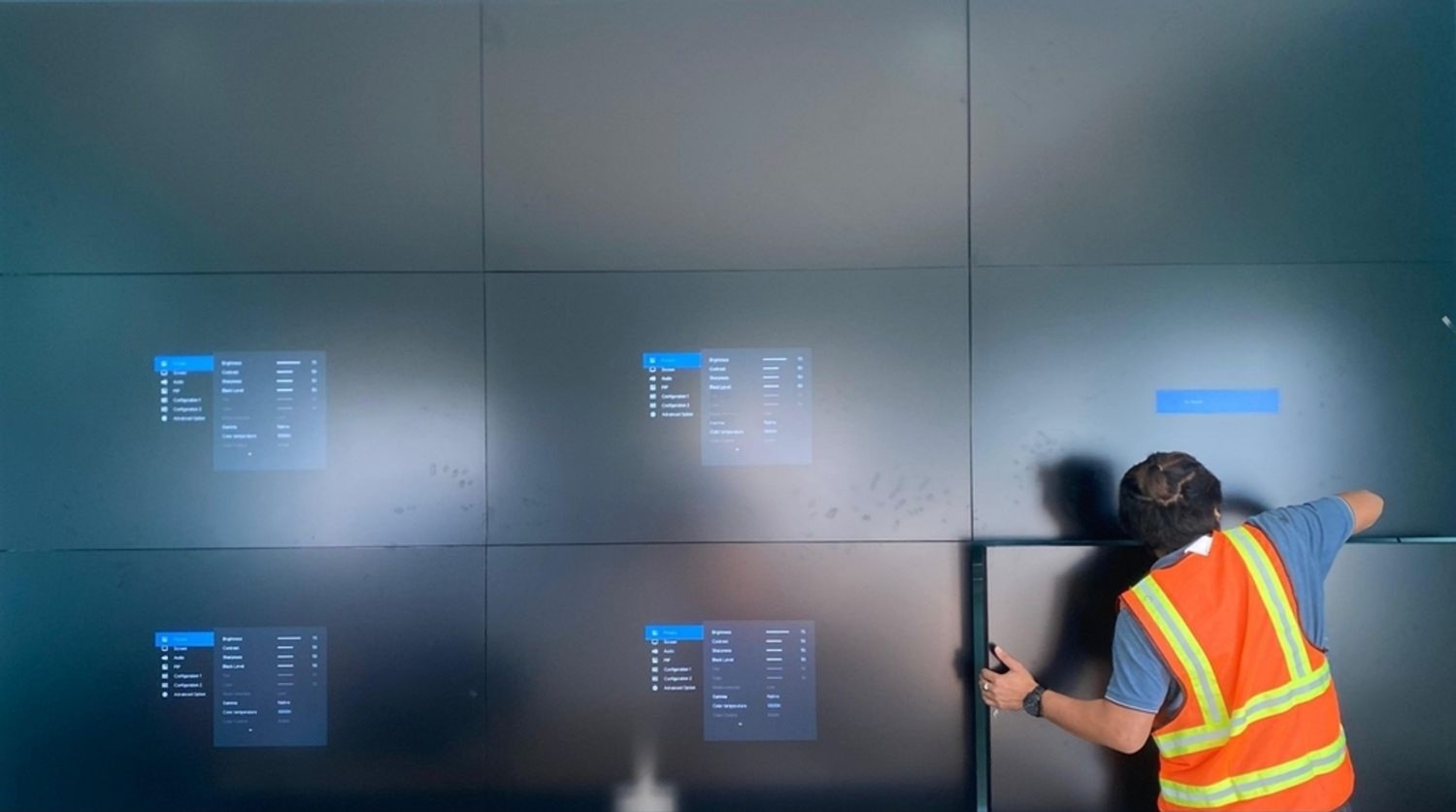
A successful video wall installation involves far more than mounting screens side by side. The display technology, viewing distance, structure behind the wall, power, signal sources, controller and content workflow all need to work together. Decisions made at the start affect image quality, reliability and long-term upkeep.
This guide is for Singapore business owners, facilities and IT managers, project managers and retail or mall operators who are planning a new video wall or upgrading an existing one. It covers LCD and LED options, the planning factors that matter most, which Singapore rules may apply, the installation process, and a checklist you can use with your contractor.
Regulatory references last checked: 15 October 2026. Requirements can change, so confirm current rules with the relevant authority or your building management.
What Video Wall Installation Involves
A video wall is a display system that combines multiple screens or LED modules into one large visual surface. It can show a single image across the whole wall, separate content in different zones, or several sources at once.
Installation covers the whole system, not only the screens. A typical project includes the following parts:
| Component | What it does | Why it matters |
|---|---|---|
| Displays or LED cabinets | Produce the image | Technology choice sets image quality, viewing distance and budget |
| Mounting structure | Holds the display on the wall or a frame | Must suit the wall construction and allow service access |
| Video wall controller or processor | Splits, scales and positions content across the screens | Determines which sources and layouts the wall can handle |
| Signal sources and cabling | Deliver video from PCs, cameras, players or meeting systems | Connection types and cable runs affect reliability |
| Power and cooling | Supply and manage load and heat | Fixed electrical work has licensing implications in Singapore |
| Control and content software | Schedules content and manages layouts | Decides how easily staff can operate the wall |
Some commercial displays include basic built-in video wall functions for small arrays. Support differs between manufacturers and models, so confirm it against the datasheet of the exact model rather than assuming it.

LCD, LED and Custom Video Walls Compared
The two main technologies behave differently in practice, so choosing the right one comes first.
LCD video walls
An LCD video wall tiles professional LCD panels in a grid. LCD walls are commonly used indoors in control rooms, offices, monitoring centres and retail spaces. Their main visual trade-off is the bezel, the border around each panel. Narrow-bezel panels reduce the lines between screens, but those lines don’t disappear. Whether they matter depends on content and viewing distance.
For example, a wall of dashboards and CCTV feeds tolerates visible borders better than a wall showing one large continuous image. You can review LCD video wall solutions to see what configurations are available.
LED video walls
A direct-view LED wall builds the image from LED modules or cabinets with no panel bezels, so the surface can look continuous. Fine seams between cabinets can still appear if alignment or calibration is poor. LED suits lobbies, event spaces, large retail features and, with the right outdoor-rated product, some outdoor locations. LED also scales to sizes and shapes that LCD tiling can’t.
Pixel pitch, the distance between adjacent pixels, is the specification that matters most. It decides how close people can stand before they see individual dots, and it strongly affects cost.
Custom configurations
Some sites need curved surfaces, unusual aspect ratios, columns or walls with architectural features. These need design work early, including mounting engineering and content layouts that suit the odd shape. Start from what the display must do for viewers, not from the wall dimensions alone.
| Feature | LCD video wall | Direct-view LED wall |
|---|---|---|
| Image continuity | Visible bezels between panels | No bezels; cabinet seams possible |
| Typical setting | Indoor control rooms, offices, retail | Lobbies, venues, large features; outdoor with rated products |
| Close-range viewing | Generally suitable for shorter distances | Depends heavily on pixel pitch |
| Size and shape flexibility | Limited to panel grid | Greater flexibility |
| Key specification | Panel size, bezel width, brightness | Pixel pitch, brightness, cabinet size |
Treat this table as general guidance. Individual products differ, so confirm specifications with the supplier for your project.
Choosing a Video Wall by Environment
The right system depends on the room and the task. The table below summarises what to prioritise in common Singapore commercial settings.
| Environment | What to prioritise | Common watchpoints |
|---|---|---|
| Boardrooms and corporate offices | Legibility of shared documents, easy connection of laptops and meeting systems | Glare from windows, seating angles, simple controls for non-technical staff |
| Retail stores and shopping malls | Brightness, content scheduling, visibility from walkways | Glare, obstruction of foot traffic, landlord rules on signage and fit-out |
| Security and control rooms | Source flexibility, layout control, reliability during long operating hours | Controller input support, operator sightlines, planned maintenance access |
| Hotels, lobbies and public spaces | Visual impact, readable announcements, fit with the architecture | Viewing time of passers-by, content refresh process, maintenance disruption |
In control rooms, the controller often matters more than the display. It must support the number and type of sources operators need, such as IP camera streams, workstations and dashboards. Confirm supported inputs, layouts and decoding capacity in writing before you buy.

Planning Factors Before Video Wall Installation
Most installation problems trace back to decisions skipped during planning. Work through these factors with your contractor before ordering equipment.
Size, aspect ratio and content resolution
Start with the content. A wall that shows dashboards, CCTV tiles or spreadsheets needs different proportions and resolution from one that plays brand video. Check that the final resolution suits your source material, because stretched or upscaled content looks poor on a large surface.
Viewing distance and pixel pitch
Vendors offer different rules of thumb for matching pixel pitch to viewing distance. One supplier suggests roughly one meter of distance per millimeter of pitch. Others cite two to three meters per millimeter.
That gap is a reason to treat any formula as a starting point. Content matters too. Fine text and static graphics reveal pixel structure sooner than moving video. For critical walls, ask the supplier for a sample or an on-site mock-up.
Finer pitch costs more, so buying the finest option available is not automatically the right choice. Base the decision on how close people will actually stand.
Brightness and ambient light
A wall near a glazed facade or inside a bright mall corridor needs more brightness than one in a dim control room. Reflections and glare also affect readability. Assess lighting at the times of day when the wall is used, not only during the site visit.
Structure and mounting
Wall construction decides the mounting method. Masonry, drywall and lightweight partitions behave very differently under load. Large or heavy walls may need a supporting frame or reinforcement, and your building management may require engineering review. Confirm weight, depth and fixing method with the supplier, then check them against the building’s requirements.
Service access
Panels and modules eventually need servicing or replacement. Some products are serviced from the front, others from the rear, and rear access needs space. Decide this during design, because a wall built tight against a surface with no access can make a simple repair expensive.
Power, heat and ventilation
Large walls draw significant power and produce heat. Check the load against the available supply, and confirm ventilation requirements against the manufacturer’s operating specifications. Fixed electrical work is covered in the next section.
Sources, controller and software
List every source the wall must show, with its connection type, resolution and whether it needs to run continuously. Match that list to the controller’s inputs. Then decide who will manage content and layouts day to day, since a wall that only the installer can change quickly becomes a burden.
Continuous operation
If the wall runs for long hours, confirm that the chosen displays are rated for that duty by the manufacturer. Check manufacturer guidance on static content too, since some panel types can retain images if the same graphic stays on screen for long periods.
Singapore Rules, Approvals and Property Requirements
No single “video wall law” covers every project in Singapore. Requirements depend on what the installation involves and where it is located. This table separates legal requirements from approvals, property rules and good practice, because they are often confused.
| Topic | Type | When it applies | Who to check with |
|---|---|---|---|
| Electrical work | Statutory | Fixed electrical work for the installation, such as new circuits or distribution changes | Energy Market Authority (EMA); your licensed electrical worker |
| Work at height | Statutory | Installation work from an elevated position where a fall could occur | Ministry of Manpower (MOM); your contractor’s safety lead |
| Outdoor advertisement display | Authority approval | Outdoor signs or displays intended as advertisements | Building and Construction Authority (BCA) |
| Construction noise | Statutory, scope-dependent | Work that counts as construction work under NEA’s rules | National Environment Agency (NEA) |
| Fit-out approvals, after-hours access, loading bays, structural review | Property-specific | Depends on the landlord, mall operator or building manager | Building management or landlord |
| Staged mock-ups, factory acceptance tests | Industry practice | Good practice on larger or critical projects | Your contractor |
Electrical work
EMA states that electrical works at consumers’ premises must be carried out by Licensed Electrical Workers. The class of licence needed depends on the scale of the installation. Plugging a display into an existing socket is different from adding a dedicated circuit or modifying a distribution board. Ask your contractor which of your project’s electrical works need a licensed worker, and ask who will be appointed. EMA’s public portal lets you check licence details.
Work at height
The Workplace Safety and Health (Work at Heights) Regulations 2013 apply to every workplace. They define hazardous work at height by reference to a possible fall of more than 3 metres. Even below that height, falls remain a safety risk, so ask how your contractor plans to manage ladders, platforms and lifting of heavy panels.
Outdoor-facing displays
BCA handles applications to display outdoor advertisements and signboards before installation, and URA guidelines apply in the Central Area. An LED wall facing a public street or walkway may fall within these rules, depending on how it is used and where it sits. If your display is visible from outside the building, check with BCA before purchasing.
Noise and working hours
NEA’s construction noise rules cover permitted work hours and a no-work rule on Sundays and public holidays at sites near residential buildings and noise-sensitive premises. Whether a given video wall installation counts as construction work depends on its scope. In practice, building management often sets the working hours you will follow, particularly for malls and offices, so ask for these early.
Landlord and mall requirements
Malls and commercial buildings commonly impose their own rules, such as approved contractor lists, insurance, access passes, loading restrictions and work-hour limits. These are contractual or property-specific requirements, not national laws, and they vary by building. Never assume one operator’s rules apply to another.
The Video Wall Installation Process

| Stage | Action | Dependency | Output |
|---|---|---|---|
| Brief | Define purpose, content, audience, operating hours | Stakeholder agreement | Written requirements |
| Site survey | Inspect wall, power, access, lighting, cable routes | Building access | Survey report |
| Design | Select display type, size, controller and layout | Survey and brief | Drawings, specification |
| Approvals | Obtain landlord, building and any authority clearances | Design details | Approvals on record |
| Procurement | Order, receive and, where practical, pre-test equipment | Approved design | Verified equipment |
| Installation | Mount, cable, power, connect | Permits, access slots | Installed system |
| Commissioning | Calibrate, test sources and failover, check operation | Completed installation | Test records |
| Handover | Train staff, supply documentation | Successful testing | Manuals, contacts, maintenance plan |
Common Mistakes to Avoid
- Choosing size before purpose. A wall chosen by space alone often fails at the task it was bought for.
- Ignoring viewing distance. LED too coarse for close viewers shows visible dots. Pitch finer than needed raises cost without benefit.
- Underestimating the controller. The display is only half the system, and an undersized controller limits sources and layouts.
- Forgetting service access. Walls with no practical way to reach modules turn small faults into large jobs.
- Leaving power and approvals late. Electrical load checks and building approvals can affect the whole schedule.
- Skipping content planning. A wall without a content plan and an owner often ends up showing stale material.
- Assuming all rules are national. Many requirements come from the landlord or building, not the government.
What to Ask a Video Wall Contractor
Quotes are easier to compare when every contractor answers the same questions.
- What exactly is included: displays, mounting, controller, cabling, power works, software, commissioning and training?
- Who will carry out and certify the electrical works, and what licence do they hold?
- How will work at height be managed?
- What are the maintenance, warranty and spare-part arrangements?
- How are faults reported, and what response arrangements are offered?
- Which building approvals do you expect to need, and who will apply?
- Can we see a sample, mock-up or reference site for similar requirements?
- What will our staff need to do day to day, and what training is provided?
Costs vary widely with technology, size, pixel pitch, structure, power works, controller needs and site conditions. I haven’t included figures because no verified Singapore pricing was available. Ask for an itemised quotation so you can see where the money goes.
Maintenance and Long-Term Planning
Plan for the wall’s whole life. That includes cleaning, firmware updates, spare modules, periodic calibration, and who handles faults after warranty. For LED walls, ask whether replacement modules will remain available and how colour matching is handled when parts are swapped. For LCD walls, ask how a failed panel is replaced and whether similar panels will still be sold.
Video Wall Installation Checklist
Phase 1: Planning
- Write down the wall’s purpose, audience, content types and operating hours.
- List every video source and its connection type.
- Identify the viewing distances and the closest viewer.
- Name the project owner and who will manage content.
Phase 2: Preparation
- Commission a site survey covering wall structure, power, lighting and access.
- Compare LCD and LED against your viewing distance and content.
- Request itemised quotes using the contractor questions above.
- Ask for a sample or mock-up for critical or close-viewing walls.
Phase 3: Approvals
- Confirm landlord, mall or building management requirements in writing.
- Confirm who will carry out and certify electrical works.
- Check whether an outdoor display needs a BCA licence.
- Agree work hours and access arrangements.
Phase 4: Installation
- Review the contractor’s work-at-height plan.
- Confirm cable routes and service access before closing up the wall.
- Check delivered equipment against the specification.
Phase 5: Testing and handover
- Test every source, layout and schedule.
- Check colour, brightness and alignment across the whole surface.
- Obtain manuals, test records and support contacts.
- Train the people who will operate the system and agree a maintenance plan.
Planning Your Video Wall Project
Frequently Asked Questions
How long does video wall installation take?
It depends on the size of the wall, the structure, the approvals needed, equipment delivery and the building’s access hours. Ask your contractor for a written schedule after the site survey.
Do I need a permit for a video wall in Singapore?
Not always. An indoor video wall inside your own premises may need no authority permit, but fixed electrical work needs licensed workers and your landlord may require approvals. Outdoor displays visible to the public may need an outdoor advertisement licence from BCA.
Is LED or LCD better for a video wall?
Neither is better in every case. LCD suits many indoor settings where visible bezels are acceptable. LED suits large, continuous surfaces and can work at distance, but pixel pitch and cost need careful matching to the viewing distance.
Can an existing room be retrofitted?
Often yes, but the wall construction, power, cable routes and service access must be assessed first. A site survey identifies what needs to change.
Who should manage the content?
Decide this before installation. Content ownership affects which software and controls you need.

Welcome to Smart AV Solutions Singapore, your destination for smart home solutions. We help you transform your home into a modern and efficient living space with our state-of-the-art products and services. Discover the full potential of a smart home with us today.
Shop Now
Quick Links
Get In Touch
2 Yishun Industrial Street 1, #04-11 North Point Bizhub, Singapore 768159
- Email: sales@techcom.co
- Phone: +65 6677 0000
- Phone: +65 9277 8888
- Hours: Mon-Fri 9:00AM - 5:00PM