Video Conferencing System: What It Is and How It Improves Modern Communication
By: Smart AV Solutions
Published: March 19, 2026

What Is a Video Conferencing System?
Communication in the workplace has changed significantly over the last few years, moving away from traditional desk-bound meetings. Today, professional teams are rarely all in the same office at the same time, with many people working from home, satellite branches, or even different countries. Because of this shift toward hybrid work, having a reliable video conferencing system has become a vital requirement for staying connected and keeping projects moving forward.
A video conferencing system allows people to meet face-to-face, speak clearly, and share complex ideas through high-quality video and audio in real time. Instead of spending hours traveling or trying to coordinate everyone in one physical location, teams can now connect instantly with the touch of a button. This technology bridges the gap between remote and in-office staff, ensuring that everyone feels like they are part of the conversation regardless of where they are sitting.
In Singapore, businesses, schools, and government organizations are rapidly adopting a video conferencing system to improve daily communication and boost overall productivity. By integrating modern tools like large high-definition screens and interactive displays, these systems make digital meetings much more engaging and far easier to manage than old-fashioned speakerphones. This setup allows presenters to show their slides or documents clearly while still being able to see the reactions of everyone in the meeting.
This guide is designed to help you understand exactly how a video conferencing system works and the specific benefits it can bring to your organization. We will explore how choosing the right professional equipment can make your virtual meetings more effective, helping you save time and reduce the stress of technical issues. By the end, you will see why investing in a high-quality setup is the best way to future-proof your business communications.
Is your team ready for a world-class video conferencing system? At Smart AV Solutions, we provide professional installation and expert setup for businesses across Singapore to ensure every meeting is seamless.
Click Here to Get a Free Quotation on Your Video Conferencing System!
- High-Definition Camera: Captures sharp video of the participants so that non-verbal cues and expressions are easy to see.
- Audio Equipment: Includes sensitive microphones to pick up voices and high-quality speakers to ensure every word is heard without distortion.
- Display Screen: A monitor or television that allows you to see other participants clearly and view shared documents or presentations.
- Meeting Software: Platforms like Zoom, Microsoft Teams, or Google Meet act as the “brain” of the system, securely connecting all the different users.

How Video Conferencing Systems Work?
At its most basic level, a video conferencing system acts like a digital bridge that captures your image and voice, sends that information over the internet, and displays it to other participants instantly. This process happens so fast that you can have a natural conversation with someone on the other side of the world without any noticeable delays. It turns a standard internet connection into a powerful tool for face-to-face collaboration, no matter where your team is located.
- The camera records your video: High-definition lenses capture your movements and facial expressions in real time.
- The microphone captures your voice: Sensitive audio sensors pick up what you are saying while often filtering out distracting background noise.
- The system sends data through the internet: Your video and audio are turned into digital “packets” and sent securely to the other meeting members.
- Other participants receive and see/hear it: Their screens and speakers turn that data back into a clear picture and sound.
Why Video Conferencing Systems Are Important?
In today’s professional world, a video conferencing system is no longer just an extra tool; it has become a key part of daily business operations. It allows organizations to stay agile and connected, ensuring that important decisions can be made quickly without everyone needing to be in the same physical room.
Faster Communication
With a professional video conferencing system, teams can meet instantly at the touch of a button. You no longer have to wait days or weeks for everyone to coordinate their schedules and travel to a central office. This speed allows projects to move forward much faster, as questions can be answered and problems solved in real-time through a quick digital face-to-face chat.
Saves Time and Cost
Supports Remote Work
Better Understanding
More Flexible Meetings
Using a video conferencing system makes scheduling much more flexible and less stressful for everyone involved. Meetings can be easily adjusted or recorded for those who couldn’t attend, ensuring that no one misses out on vital information. This adaptability allows your business to respond quickly to changing situations, making your entire team more efficient and better organized.

Key Features of Modern Video Conferencing Systems
High-Resolution Cameras
Modern systems use high-quality cameras, often with 4K resolution, to provide life-like video that makes you feel like you are in the same room as your colleagues. Some of these advanced cameras even include AI features that automatically zoom in and focus on the person speaking while framing the rest of the group perfectly. This ensures that everyone stays visible and engaged throughout the entire video conferencing system session.
Clear Audio Systems
A professional video conferencing system relies on high-end microphones and speakers to ensure that every word is heard clearly without any annoying echoes. Many of these audio tools now include background noise cancellation, which filters out sounds like air conditioning or paper rustling. This crystal-clear sound quality is essential for preventing misunderstandings and keeping the conversation flowing naturally.
Screen Sharing
Wireless Connectivity
Many of the latest systems allow users to connect their laptops or tablets wirelessly, which completely removes the need for messy cables on the boardroom table. This makes the setup look much cleaner and allows different presenters to take control of the screen without having to swap plugs or adapters. Wireless features save a lot of time during the start of a meeting, helping your video conferencing system stay efficient and professional.
Integration with Meeting Platforms
Most professional hardware is designed to work smoothly with popular platforms like Zoom, Microsoft Teams, and Google Meet. This means you don’t have to learn a new program; your video conferencing system will launch your favorite app with just one touch. Having this seamless integration ensures that you can join calls with external clients or partners without any “connection errors” or software bugs.

The Role of Displays in a Video Conferencing System
How Smart AV Solutions Improve Video Conferencing System
At Smart AV Solutions, we believe that a great video conferencing system is only as good as its display. We help businesses in Singapore move beyond small, blurry laptop screens by installing professional-grade visuals that make every participant feel present. By choosing the right screen for your room size, we ensure that your meetings are more engaging, productive, and professional.
Interactive Smart Whiteboards for Better Collaboration
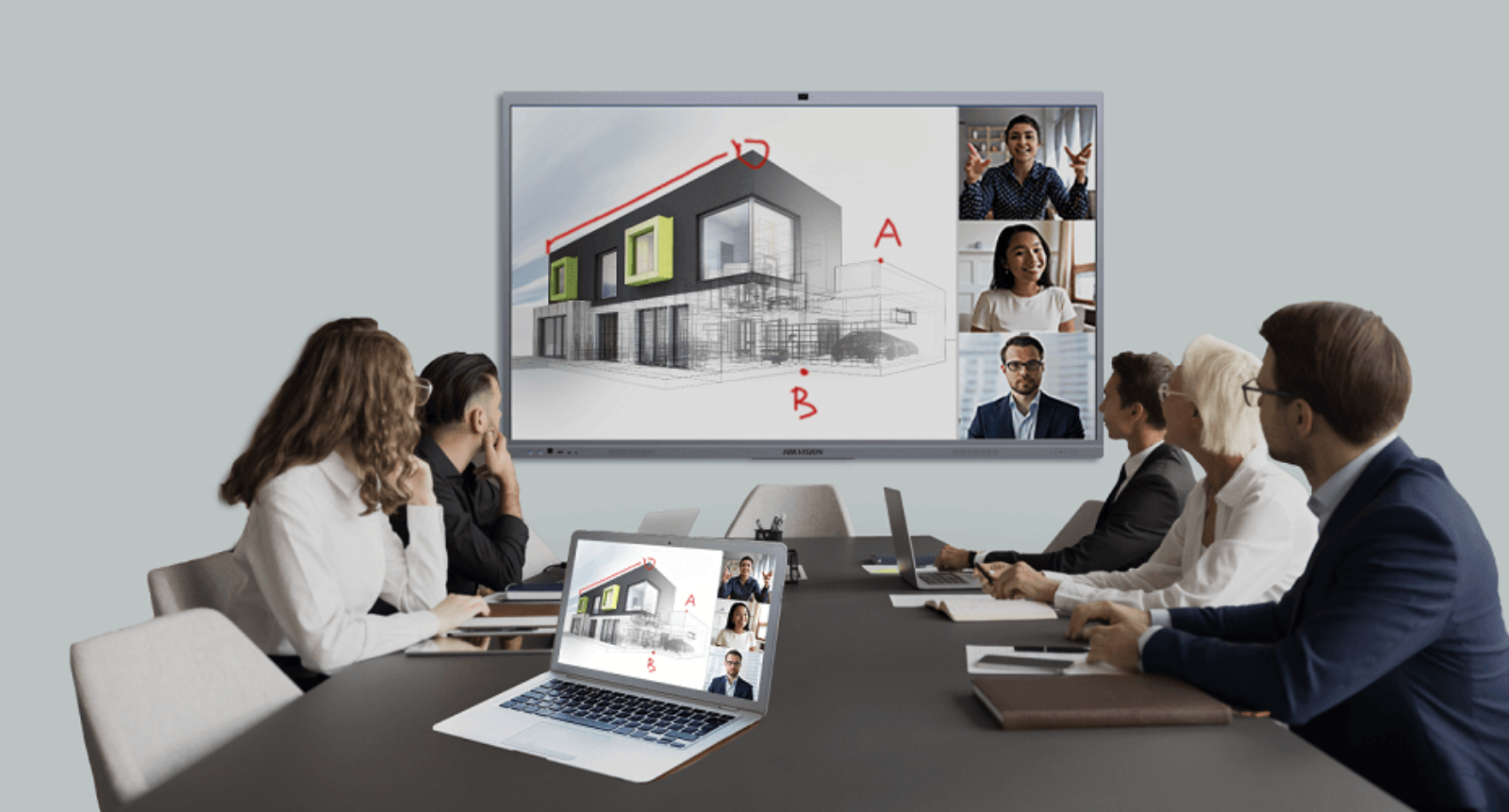
Adding an interactive smart whiteboard to your video conferencing system transforms a passive meeting into a hands-on workspace. These touch-sensitive screens allow you to draw, take notes, and highlight documents directly on the display while your remote colleagues watch in real-time. This level of interaction makes it much easier to brainstorm ideas or explain complex plans without the confusion of just talking over a static slide.
Learn more about Interactive Smart Whiteboard or browse our full catalogue.

Standard Flat LED Wall Displays for Clear Visibility
For large boardrooms or town hall meetings, a standard flat LED wall provides the ultimate brightness and clarity for your video conferencing system. These displays are built to be seen from a long distance, ensuring that everyone in a massive room can read small text and see facial expressions clearly. Because they don’t have the distracting “grid lines” found on older screen setups, your video calls look like one seamless, giant window into another office.

LCD Video Walls for Organized Viewing
An LCD video wall is an excellent choice for a video conferencing system in a command center or a large corporate lobby. These systems use multiple high-definition monitors tiled together, allowing you to show many different video feeds or data dashboards at the same time. This organized layout is perfect for managers who need to see several remote teams simultaneously while keeping a close eye on project metrics or live data.
Learn more about LCD Video Wall or browse our full catalogue.

Optional: Curved LED Walls for Immersive Experience
If you want to create a truly world-class meeting space, a curved LED wall can provide a deeply immersive experience for your video conferencing system. The subtle curve of the screen matches the natural field of vision, making remote participants appear as if they are sitting at the same circular table as you. This high-end setup is ideal for executive suites where creating a powerful, life-like connection with global partners is the top priority.
Learn more about Curved Led Wall or browse our full catalogue.
Where Video Conferencing Systems Are Used
Because they bridge the gap between different locations, video conferencing systems are used in many different professional and educational environments to keep people connected.
Offices and Meeting Rooms
Modern businesses rely on a video conferencing system for their daily operations, including internal team syncs and important client calls. Having this technology in a standard meeting room allows local staff to speak face-to-face with colleagues who may be working from a different branch or a home office. It ensures that everyone has access to the same information at the same time, making team discussions much more productive and reducing the chance of miscommunication.
Training and Education
Schools and specialized training centers use a video conferencing system to facilitate remote learning and interactive virtual lessons. This allows students to attend classes from anywhere, ensuring they don’t miss out on vital education due to travel or health constraints. Instructors can use the system to share their screens, play educational videos, and interact with students in real time, making the digital classroom feel just as engaging as a physical one.
Conference Rooms and Boardrooms
Remote Work Environments
For employees working from home, a reliable video conferencing system is the most important tool for staying connected with their teams. Whether it’s a quick morning check-in or a full-day collaborative workshop, these systems help remote workers feel like a valued part of the company culture. It removes the feeling of isolation by allowing for face-to-face interaction, which is essential for maintaining strong working relationships and keeping morale high
Choosing the Right Video Conferencing System
Selecting the best video conferencing system depends on your unique business needs and the physical layout of your office. By taking the time to plan, you can avoid common technical issues and ensure every meeting runs smoothly.
Consider Your Room Size
The dimensions of your meeting space are the most important factor in choosing a video conferencing system. Smaller “huddle rooms” can work well with compact, all-in-one video bars that combine a camera and speakers into a single device. However, larger boardrooms or auditoriums require much more powerful audio systems, multiple microphones, and high-brightness displays or LED walls to ensure every participant can be seen and heard clearly from any seat.
Think About Usage
Different business activities require different hardware setups within your video conferencing system. For example, training sessions benefit most from interactive smart displays that allow for real-time digital whiteboarding and drawing. In contrast, large executive meetings or webinars may require sophisticated multi-camera setups and large-scale video walls to provide a professional, high-impact experience for all attendees.
Ease of Use Matters
A successful video conferencing system should be simple enough for anyone to use without needing a background in technology. Look for systems that offer a “one-touch join” feature, allowing users to start a meeting instantly from a simple tablet or wall-mounted controller. When a system is intuitive and user-friendly, it reduces the need for constant IT support and encourages your team to collaborate more frequently.
Scalability
As your organization grows, your video conferencing system should be able to expand along with your team. It is wise to choose a modular system that allows you to easily add more cameras, microphones, or secondary screens as you move into larger offices or hire more remote employees. Choosing a scalable solution protects your initial investment and prevents you from having to buy an entirely new system every time your communication needs change.

The Future of Video Conferencing Systems
- More Advanced AI Features: Smart cameras will automatically frame the person speaking, while AI-driven audio will cancel out background noise like typing or nearby conversations perfectly.
- Better Integration with Business Tools: Your meeting room hardware will sync instantly with your digital calendars, project management apps, and cloud storage, allowing for a seamless transition from planning to execution.
- Improved Collaboration Features: Enhanced “digital twins” or 3D avatars may soon allow for even more immersive brainstorming sessions where team members can interact with virtual objects together.
Conclusion
A professional video conferencing system has become one of the most important tools for modern business communication, bridging the gap between people in different locations. It allows teams to connect, collaborate, and share their best ideas instantly without the need for expensive and time-consuming travel. By investing in the right hardware—such as interactive smart whiteboards, high-definition LED walls, and seamless video walls—your meetings can become much more engaging, clear, and effective for everyone involved.
For businesses in Singapore, choosing a reliable video conferencing system is a practical and necessary step toward improving daily communication and boosting overall productivity. As the demand for hybrid work continues to grow, having a high-quality setup ensures that your organization stays professional and connected in a competitive global market. Whether you are upgrading a small huddle room or a massive executive boardroom, the right technology makes a world of difference in how your team works together.
When it comes to high-quality installations, Smart AV Solutions is proud to be one of the top choices for a professional video conferencing system in Singapore. We don’t just supply the equipment; we provide expert guidance, seamless setup, and long-term support to ensure your technology never lets you down. Our local team understands the specific needs of Singapore’s corporate and educational sectors, making us the trusted partner for transforming your workspace into a future-ready communication hub.
Don’t let technical glitches or poor audio hold your business back. At Smart AV Solutions, we provide professional installation in Singapore to ensure your video conferencing system is crystal clear and stress-free every time.
Frequently Asked Questions
What exactly is included in a professional video conferencing system?
A complete video conferencing system typically includes a high-definition camera, a microphone that filters out background noise, and speakers that make voices sound natural. It also needs a display screen—like an interactive whiteboard or a large LED wall—and a computer or built-in software to run meetings on platforms like Zoom or Microsoft Teams. Having all these parts professionally synced ensures you don’t face “connection errors” during important calls.
Can I use my existing office TV for a new video conferencing system?
In many cases, yes, you can connect a professional video conferencing system to an existing high-quality TV or monitor using an HDMI cable. However, for larger boardrooms, we often recommend upgrading to a professional display or an interactive smart board to ensure the text is readable and the colors are vibrant. A professional-grade screen is designed to run for long hours without overheating, which is better for a busy office environment.
Do I need a high-speed internet connection for a video conferencing system to work?
Yes, a stable and relatively fast internet connection is the “fuel” that keeps a video conferencing system running smoothly without lagging or blurring. We usually recommend a wired internet connection (Ethernet) rather than just relying on Wi-Fi to ensure the video stays in high definition even during long meetings. Our team at Smart AV Solutions can test your office network during installation to make sure it can handle the data needed for clear video calls.
How many people can join a meeting using a video conferencing system?
The number of participants depends more on the software you choose (like Zoom or Teams), but your video conferencing system hardware determines how many people in the physical room can be seen and heard. For a small huddle room, a simple system is perfect for 2–4 people, while a large boardroom setup uses multiple microphones and wide-angle cameras to cover 20 or more people. We help you choose the right gear so that everyone in the room is included in the conversation.
Is it difficult to learn how to operate a modern video conferencing system?
Modern systems are designed to be “plug-and-play,” meaning they are very easy to use even if you aren’t a tech expert. Most professional video conferencing systems feature a simple touch-screen controller on the table that lets you start a meeting with just one tap. When we perform an installation at Smart AV Solutions, we provide hands-on training to your staff to ensure everyone feels confident using the system from day one.
Schedule an
Appointment
For a Personalised Demo
2 Yishun Industrial Street 1, #04-11 North Point Bizhub, Singapore 768159

Welcome to Smart AV Solutions Singapore, your destination for smart home solutions. We help you transform your home into a modern and efficient living space with our state-of-the-art products and services. Discover the full potential of a smart home with us today.
Shop Now
Quick Links
Get In Touch
2 Yishun Industrial Street 1, #04-11 North Point Bizhub, Singapore 768159
- Email: sales@techcom.co
- Phone: +65 6677 0000
- Phone: +65 9277 8888
- Hours: Mon-Fri 9:00AM - 5:00PM